
Professional USB Type-C Cable: What to Check Before You Buy for Reliable Performance
2026-10-12
Most USB-C cables look identical, but the difference between reliable performance and constant frustration comes down to a few critical specs most buyers overlook. Power delivery, data transfer speed, shielding, and connector build quality all determine whether your cable handles daily demands or becomes a bottleneck. Before you pick another cable that underdelivers, it's worth checking the details that separate professional-grade USB-C from the rest. At EBCYX, we design cables to meet those stricter standards—so you can buy with confidence instead of guesswork.
Peel Back the Jacket Before Trusting the Cable
A cable's outer jacket can hide more than it reveals. That smooth, shiny sheath might look reassuring, but it's what's underneath that determines whether you're dealing with a dependable conductor or a future headache. Before you run that line across a wall or bury it in conduit, take a blade and carefully slice away a section of the jacket. Inspect the insulation on each individual wire—look for thin spots, uneven coloring, or signs of recycled material that feels brittle to the touch. A proper cable should have consistent insulation thickness and a clean separation between conductors, not a tangled mess of stripped-down strands.
Don't stop at a visual check. Gently flex the exposed section and listen for crackling—that's a sign the inner insulation has already begun to degrade. Also examine the shielding or filler materials. Quality cables use a uniform layer of foil or braid, not a patchy application that leaves gaps for interference. If the jacket peels away too easily, or the inner components shift loosely inside, treat that as a red flag. Trust is earned layer by layer, and the only way to know what you're dealing with is to look past the surface gloss.
That USB-C Cable May Not Deliver the Speeds It Claims
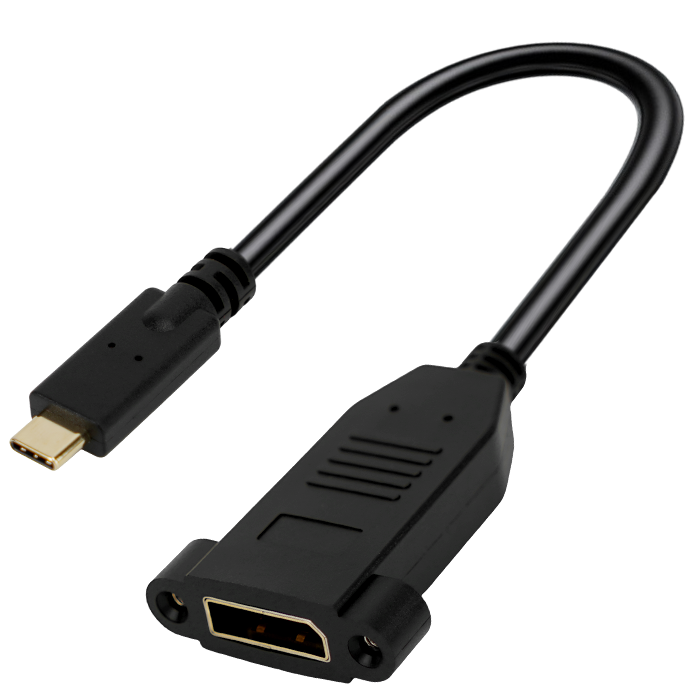
A cable stamped with a USB-C connector tells you almost nothing about how fast it can actually move data. USB-C is just the shape; the underlying standard could be USB 2.0 crawling at 480 Mbps or USB4 topping out beyond 40 Gbps. Plenty of cables on store shelves boast impressive peak numbers on the box, but those figures often apply only to very short lengths, specific host devices, or ideal signaling conditions.
Many cheap or bundled cables skip the e-marker chip required for higher power and data rates, leaving them stuck at USB 2.0 speeds despite looking identical to a premium 10 Gbps cable. Others advertise a protocol they support only partially—say, USB 3.2 Gen 2 on paper but with shielding so thin that error correction kicks in constantly and real-world throughput collapses when the cable is bent or routed near other wires. The result is a drawer full of cables that all look the same and behave completely differently.
Before trusting the label, check for a certification logo or use a tool that reads the cable's built-in identity information. Even then, test the actual transfer speed with a known fast drive. A cable that cannot hold a stable SuperSpeed link will downgrade to older modes silently, so the only reliable proof is measured throughput, not the marketing on the package.
Certification Marks That Actually Mean Something
Plenty of labels promise the world, but only a handful actually deliver. Certifications like Fair Trade, USDA Organic, or B Corp aren't just marketing stickers; they require third-party audits, traceable supply chains, and ongoing compliance. That's why you'll rarely see them slapped on a product without a paper trail to back them up.
What sets these marks apart is the cost of getting caught. A company that misuses the Energy Star logo or falsely claims LEED certification faces real legal consequences, not just a slap on the wrist. That accountability filters out most of the pretenders, leaving certifications that genuinely reflect a product's environmental or ethical footprint.
When you spot one of these badges, take a second to look up the certifying body. The meaningful ones are usually run by independent nonprofits or government agencies with published standards and complaint mechanisms. If the standard isn't publicly available or the audit is done in-house, the mark probably means very little.
Bend It a Few Times and You Will Know
There's a quiet kind of knowledge that comes only through repeated touch. Take a strip of metal, a thin branch, a plastic ruler—bend it once and you get an impression, bend it again and the material starts to confess. A few careful flexes reveal whether it will spring back cleanly, hold a new shape, or crack under the strain. No spec sheet tells you this as honestly as your own hands.
The trick is not to force the motion but to listen while it happens. The third or fourth bend often exposes what the first disguised: a weak spot near the edge, a fatigue that deepens with each curve, a resilience that only becomes obvious when the material has been pushed past its comfort zone. That feel for limits cannot be rushed or looked up.
Shielding That Survives Next to a Wi-Fi Router
Most shielding advice falls apart the moment you place a sensitive device within arm’s reach of a Wi-Fi router. The 2.4 GHz and 5 GHz signals are relentless, and at close range even a tiny unsealed gap becomes a leaky slot antenna. Foil tape that worked fine for a noisy power supply suddenly loses its edge because the adhesive layer isn’t conductive across the overlap, leaving a capacitive break. If you want shielding that actually holds up here, you have to treat the enclosure as a continuous conductive surface, not a patchwork.
The materials matter less than the seams, but copper mesh with a tight weave beats aluminum foil for high-frequency work because it doesn’t tear as easily when you need to fold corners. Conductive elastomer gaskets can bridge the gap between a lid and a chassis, but only if you compress them evenly—hand-tightened screws in a plastic housing won’t do it. A better trick is overlapping metal flanges by at least a quarter wavelength at 2.4 GHz, which is roughly 3 cm, though in practice a 1 cm overlap with continuous metal-to-metal contact often survives because most consumer routers don’t blast full power unless you’re streaming 4K video.
Grounding is where people usually get stuck. A floating shield can re-radiate interference instead of shunting it, so tie the enclosure to the device’s reference ground at multiple points, not just one corner. Then test before you trust it: place a near-field probe near the suspected leak and watch the spectrum analyzer while the router runs a speed test. Sometimes rotating the router 90 degrees changes the polarization enough to drop the coupling by 10 dB, which means your shield only has to handle the remainder. That’s the kind of practical margin that keeps a sensitive preamp alive on a crowded desk.
A Loose Connector Can Ruin Reliable Performance
Most reliability failures don't come from dramatic component burnouts. They start quietly, with a connector that has backed out just enough to break full contact. A few thousandths of an inch of separation can turn a solid electrical path into a series of microscopic make-and-break events. Resistance climbs, voltage dips, and sensitive circuits begin to misbehave in ways that are hard to reproduce on a test bench.
Vibration and thermal expansion make the problem worse. Every cycle of heating and cooling works the connector shell like a ratchet, gradually pulling the mating surfaces apart. Once a small gap opens, the exposed metal can oxidize or arc, pitting the contact points. What was once a reliable connection becomes a source of noise, data errors, or unexpected shutdowns that only appear under load or on the road.
The fix is rarely complicated, but it does require discipline. Check that locking tabs are fully engaged, use the specified torque for threaded collars, and replace any connector that shows signs of fretting or discoloration. A few seconds of inspection can prevent hours of troubleshooting later. Reliable performance depends on every link in the chain holding tight.
FAQ
Look for the USB-IF certification logo or check if the cable lists 5A and 20V ratings. Cables with an eMarker chip will negotiate proper power delivery and prevent unsafe current draw. Also check the wire gauge—thicker conductors with a lower AWG number reduce resistance and heat.
A 60W cable is only rated for 3A at 20V, while a 100W cable supports 5A at 20V. If your laptop charges at 65W or higher, a 60W cable may throttle charging speed or trigger a slow-charge warning. For anything above 60W, you need a cable with an eMarker set to 5A.
For charging only, data speed doesn't matter. But if you ever connect an external SSD or dock, a 480Mbps cable will bottleneck transfers. A cable that supports 10Gbps or 20Gbps uses better shielding and twisted pairs, which also improves signal integrity if you later use it for displays.
Many cheap cables only wire the USB 2.0 data lines and power, skipping the high-speed lanes required for DisplayPort Alt Mode or Thunderbolt. Check for 4K video support or DP Alt Mode on the packaging. Without those four SuperSpeed pairs, no video signal will pass.
Not necessarily. Braiding protects the outer jacket from cuts, but the weak point is usually the strain relief where the cable meets the connector. Look for a thick, flexible strain relief—often with a longer molded boot—rather than just a braided exterior. Also check bend-life ratings if available, like 10,000 cycles.
USB-IF certification means the cable has passed compliance testing for electrical performance, safety, and interoperability. It reduces the risk of voltage drop, overheating, or compatibility issues. While non-certified cables may work, the extra cost often buys peace of mind, especially for high-wattage charging.
Absolutely. Cable resistance increases with thinner wires, which drops voltage under load and can slow charging. A 1-meter cable with 22 AWG power wires will outperform a 3-meter cable with 28 AWG wires. Even at the same length, lower AWG numbers mean less voltage sag.
Conclusion
Before you trust any professional USB-C cable, slice open the outer jacket on a sample or inspect the strain relief near the connectors. Look for a tight braided shield that runs the full length and a drain wire that actually contacts the metal shell—many cheap cables leave this floating, which invites interference when you sit next to a Wi-Fi router. Flex the cable a few times near the plug; if the connector wobbles or the collar slides back, the internal solder joints are already under stress and will fail mid-transfer. A properly built cable should feel firm where the overmold meets the shell, with no audible click or gap when you wiggle it.
Ignore the marketing numbers on the package and test the cable with a device that reads the actual negotiated USB or Thunderbolt speed, because a lot of cables only reach 480 Mbps regardless of what the box says. Certification marks like the USB-IF logo with a specific speed rating or the Thunderbolt lightning bolt are meaningful only if they match the cable's construction and not just the connector shape. If the cable has a thick, well-formed shield and a connector that stays put after bending, you have a much better chance of getting consistent file transfers and display output without random dropouts.
Contact Us
Contact Person: David Yang
Email: [email protected]
Tel/WhatsApp: 8615814734054
Website: https://www.ebcyx.com/
